
As outlined at Grails – How to Use Native Server Logging Configuration (e.g. Tomcat GlassFish JBoss), it may be advisable to remove any conflicting logging implementation when deploying a Grails application into a production environment. I’ll give a full source example on how to achieve this and how to work-around an issue which prevents a Grails 1.2.0 and 1.2.1 applications from starting.
Unfortunately, each server provides a distinct set of logging frameworks. Still worse, servers can be reconfigured to use alternate logging frameworks (e.g. JBoss can be configured to use Java Logging instead of its default Log4J implementation and Tomcat 6 can be configured to use Log4J instead of its default Java Logging implementation).
Thus you either have to prepare a war which has been set-up for a specific target environment or completely remove any logging implementation from your Grails war and add missing jars to the lib directory of your target server instead. Which one to choose may depend on whether access to the server configuration is permitted (e.g. its lib directory), how many different servers your application is to be deployed to and how hard it is for your build process to reliably produce variants specifically tailored for a particular deployment site.
Before presenting the code for a deployment to JBoss 5.1.0GA, let’s have a look at Grails’ logging architecture. In its infancy Grails just used Apache Commons Logging (JCL) to provide an abstraction level and Log4J to implement the actual logging. Although even now, all log instances injected into Grails applications still implement org.appache.commons.logging.Log, Grails no longer uses JCL, but meanwhile has moved on to SLF4J:
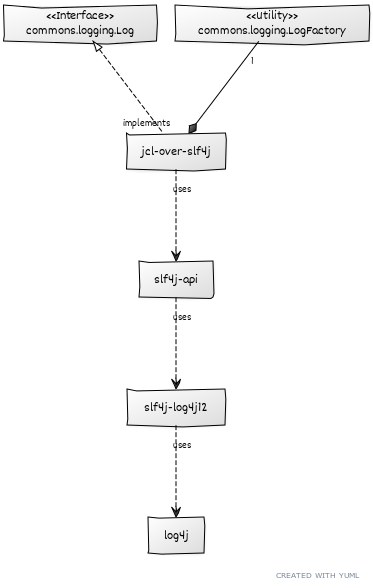
Starting with Grails 1.2, an additional bridge jul-to-slf4j which delegates Java Logging (Jul) to Slf4j is enabled by setting grails.logging.jul.usebridge = true. Be warned though, that for performance reasons this bridge should not be used when expecting heavy logging.
Now for the good news: With JBoss 5, all of the above (but excluding jul-to-slf4j) has already been integrated into the server configuration and libraries. In order to deploy a Grails application to JBoss 5, we’ll just need to get rid of the jars within your war and prevent Grails from trying to configure the logging. How to achieve this?
Within grails-app/conf/BuildConfig.groovy we’ll remove offending jars when building the war:
// TODO JBOSS - Remove own log4j and use the one supplied by JBoss instead
grails.war.resources = {stagingDir ->
    def toRemove = [
          "$stagingDir/WEB-INF/lib/log4j-1.2.14.jar", // log4j supplied by JBoss
          "$stagingDir/WEB-INF/lib/log4j-1.2.15.jar", // log4j supplied by JBoss
          "$stagingDir/WEB-INF/classes/log4j.properties", // logging conf done in JBoss only
          "$stagingDir/WEB-INF/lib/slf4j-api-1.5.6.jar", // slf4j supplied by JBoss 5+
          "$stagingDir/WEB-INF/lib/slf4j-api-1.5.8.jar", // slf4j supplied by JBoss 5+
          "$stagingDir/WEB-INF/lib/slf4j-log4j12-1.5.6.jar", // slf4j supplied by JBoss 5+
          "$stagingDir/WEB-INF/lib/slf4j-log4j12-1.5.8.jar", // slf4j supplied by JBoss 5+
          "$stagingDir/WEB-INF/lib/jcl-over-slf4j-1.5.6.jar", // jcl supplied by JBoss as well
          "$stagingDir/WEB-INF/lib/jcl-over-slf4j-1.5.8.jar", // jcl supplied by JBoss as well
        // see also Config.grails.logging.jul.usebridge - shouldn't be used
        //     http://www.slf4j.org/legacy.html#jul-to-slf4j
        //          "$stagingDir/WEB-INF/lib/jul-to-slf4j-1.5.6.jar",
        //          "$stagingDir/WEB-INF/lib/jul-to-slf4j-1.5.8.jar",
        // you might want to remove JDBC drivers when using server supplied JNDI...
        //          "$stagingDir/WEB-INF/lib/hsqldb-1.8.0.5.jar",
    ].each {
        delete(file: it)
    }
}
Within scripts/_Events.groovy we’ll disable Grails logging configuration components:
import groovy.xml.StreamingMarkupBuilder

/**
 * TODO JBOSS - Remove log4j configuration stuff (when running with JBoss or GlassFish a.s.o)
 */
eventWebXmlEnd = {String tmpfile ->

    def root = new XmlSlurper().parse(webXmlFile)

    // When running with JBoss (or GlassFish a.s.o) remove log4j configuration stuff
    def log4j = root.listener.findAll {node ->
        node.'listener-class'.text() == 'org.codehaus.groovy.grails.web.util.Log4jConfigListener'
    }
    log4j.replaceNode {}

    def log4jFile = root.'context-param'.findAll {node ->
        node.'param-name'.text() == 'log4jConfigLocation'
    }
    log4jFile.replaceNode {}

    webXmlFile.text = new StreamingMarkupBuilder().bind {
        mkp.declareNamespace("": "http://java.sun.com/xml/ns/j2ee")
        mkp.yield(root)
    }
}
You are now set to control logging within JBoss jboss-log4j.xml.
If you’re using Grails 1.2.0 or 1.2.1, JBoss still refuses to deploy your war. This is caused by version conflicts within Hibernate jars (used to be work-arounded by deleting all Hibernate jars from JBoss lib directory) and they have been fixed by GRAILS-5606 for (not yet released) Grails 1.2.2.
Graeme Rocher as well supplies a work-around for 1.2.x:
Fixed in latest hibernate plugin 1.3.0.BUILD-SNAPSHOT
It seems in order to use the latest version of Hibernate on JBoss you must include Hibernate validator otherwise you run into this classloading error. This means the hibernate plugin is forced to include hibernate-validator as a dependency even if we don’t use it which is a pretty annoying.
Anyway you can fix this yourselves in 1.2.x by adding the following dependency to BuildConfig.groovy:
runtime('org.hibernate:hibernate-validator:3.1.0.GA') {
    excludes 'sl4j-api', 'hibernate.core',
             'hibernate-commons-annotations', 'hibernate-entitymanager'
    }
Be sure to uncomment the jboss maven repository so the dependency resolvers
This work-around is included within sample sources. Just search for TODO tags.
Links:
- Source code: grailsjboss.zip, War: grailsjboss-0.1.war
- Build Lackey Blog – Using Log4j with Grails Apps on JBoss
- thejavajar Blog – JBoss AS 5.1.0 GA
- GRAILS-5606 – Deploy on JBoss 5.1.0 GA
- This diagram has been prepared using yUML (avoid IE, if you can)

 Reiner Saddey's Place
Thanks a lot for your post. That greatly helped!
I disabled grails logging configuration using the DSL and used our own log4j.properties to configure Log4j.
This has been achieved by implementing my own org.codehaus.groovy.grails.web.util.Log4jConfigListener that behaves slightly different.
Maybe you can add the xml-Namespace addition that has been added in
http://stackoverflow.com/questions/11731730/how-do-disable-log4j-plugin-in-grails
I also used
XmlUtil.serialize(new StreamingMarkupBuilder().bind { … })
to make the web.xml prettier. Not sure if that influences the output of the web.xml.
LikeLike
Pretty portion of content. I just stumbled
upon your website and in accession capital to say that
I acquire actually enjoyed account your blog posts.
Anyway I’ll be subscribing on your augment and even I fulfillment you get
admission to consistently fast.
LikeLike
Pretty! This was an extremely wonderful article.
Thanks for providing these details.
LikeLike
You should be a part of a contest for one of the highest
quality sites on the internet. I most certainly will highly recommend
this site!
LikeLike
I don’t know if it’s just me or if perhaps everyone else experiencing issues with your site.
It seems like some of the text on your posts are
running off the screen. Can somebody else please provide feedback and let me know if
this is happening to them too? This might be a issue with my web browser because I’ve had this happen previously.
Kudos
LikeLike
Code samples should scroll… Using Safari or Chrome they do 🙂
LikeLike
Currently it sounds like WordPress is the top blogging platform available
right now. (from what I’ve read) Is that what you’re using on your blog?
LikeLike